Pay Period PTO Report
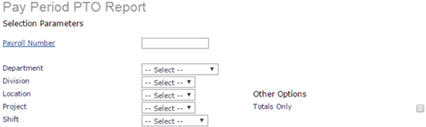
This report provides a listing of employees' PTO by payroll and year-to-date. For example:
Note: A warning message displays when you access this form, "The most recent Payroll must be posted for this report to display accurate data." Click OK to continue, then run the most recent payroll to ensure the system posts accurate data in this report.
To obtain a listing of employees' PTO:
| 1. | Enter the Selection Parameters to determine what displays on the report: |
| • | Enter the Payroll Number to run this report for a specific payroll. |
| • | Select Department to display. |
| • | Select Division to display. |
| • | Select Location to display. |
| • | Select Project to display. |
| • | Select Shift to display. |
| • | Select Totals Only to display only the grand total. |
| 2. | Click Run. |
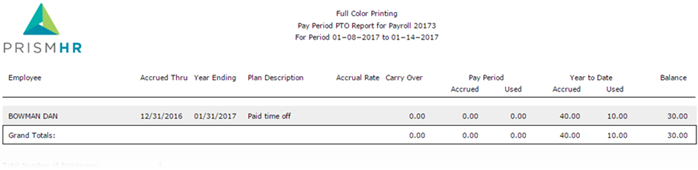
The report columns are:
| • | Employee Name: Employee name displays as last name first. |
| • | Accrued Thru: The date when the employee stops earning time off. |
| • | Year Ending: The date the year ends. |
| • | Plan Description: The description of the paid time off plan. |
| • | Accrual Rate: The rate at which the employee earns time off. |
| • | Carry Over: The hours the employee carrier over from last year's earnings. |
| • | Pay Period Accrued: The hours accrued in a pay period. |
| • | Pay Period Used: The hours used in a pay period. |
| • | Year-to-Date Accrued: The hours that were accrued year-to-date. |
| • | Year-to-Date Used: The hours used year-to-date. |
| • | Balance: The remaining hours that can be used. |
