 icon in
 Providing Employee Access to W-2 Forms
Set employee access to electronic W-2 forms for multiple employers using the Bulk Update W-2 Access form. You must initialize the W-2s before you can provide access.
Note: In Employer Details, users must provide the employer with online access to W‑2s. See Setting Online Access for Form W-2
To set employee W-2 access:
| 1. | On the Work Centers panel, click Tax > W-2 Processing > W-2 Printing > Bulk Update W-2 Access.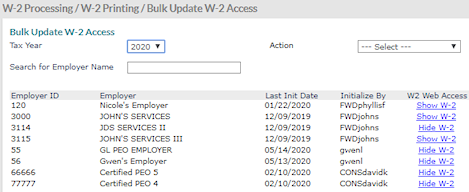 |
| 2. | Complete the fields as required. |
|
Field |
Description |
|---|---|
|
Tax Year |
Tax year for a W-2. |
|
Search for Employer Name |
Displays a list of employers after an employer name is entered. |
|
Action |
Sets access for W-2s. Options include:
To see which employees have elected electronic Form W‑2 access, use the report found in the backend system: Employer Administration > Report > Tax Reports > Quarterly & Year End Tax Reports > Web Electronic W2 By Location.
You can also click the links in the W2 Web Access column to change the settings for individual employers. |
|
If most employers are set to one access level and some are not, use the Action drop-down for the most common setting and then click the links for the exceptions. For example, you could use the drop-down to apply Set all to Early Access to the entire list and then use the links to change the access for the employers who are not ready for early access. |
|
| 3. | Click Save. |
